Handling Facebook and Website Clinic Enquiries

Sumeet Katariya
Founder, Accucia Softwares and RevisitPlus
Clinic enquiries arrive in four places: the Facebook page or lead form, the website form, WhatsApp, and the reception phone. They leak because there is no single list and no single owner. The fix is one enquiry list, one person responsible for it each shift, a status for every enquiry, and a rule that every new enquiry is called back the same day. Software makes this automatic, a shared sheet makes it possible. By Sumeet Katariya · Founder, Accucia Softwares and RevisitPlus
Where clinic enquiries actually come from
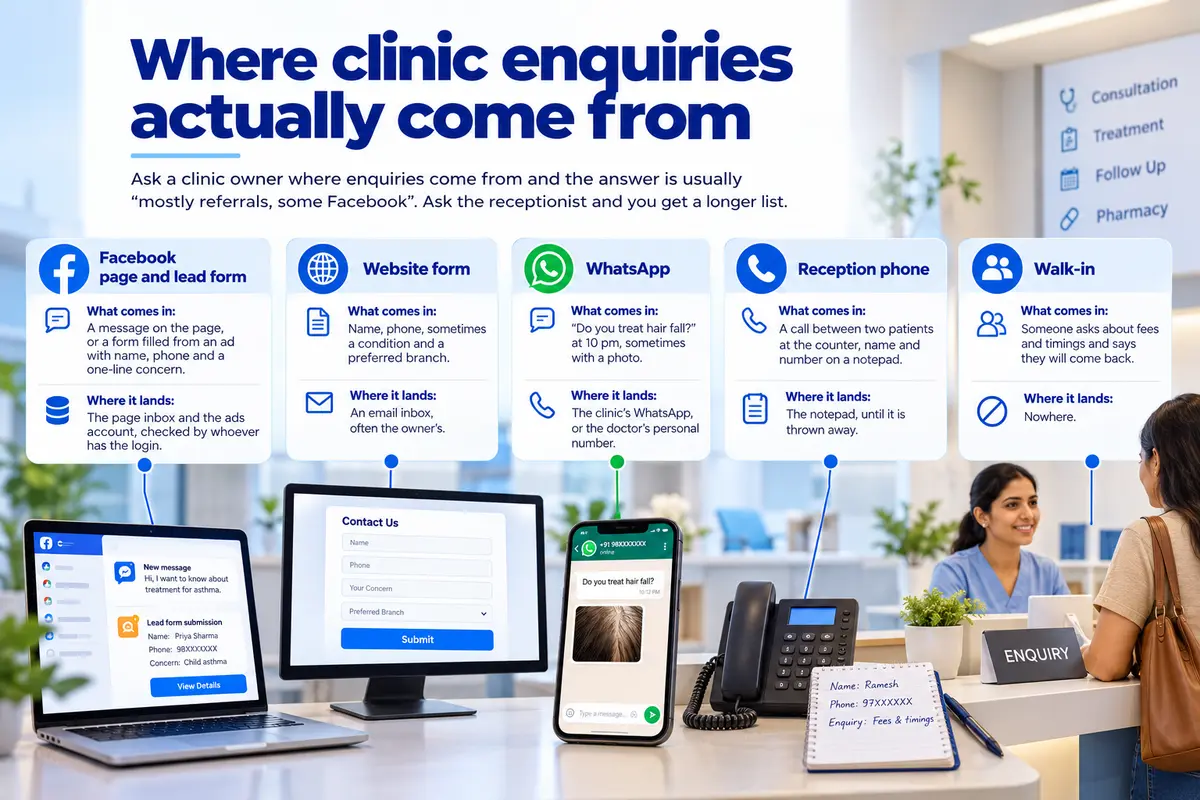
Ask a clinic owner where enquiries come from and the answer is usually "mostly referrals, some Facebook". Ask the receptionist and you get a longer list.
Facebook page and lead form
What comes in: A message on the page, or a form filled from an ad with name, phone and a one-line concern.
Where it lands: The page inbox and the ads account, checked by whoever has the login.
Website form
What comes in: Name, phone, sometimes a condition and a preferred branch.
Where it lands: An email inbox, often the owner's.
What comes in: "Do you treat hair fall?" at 10 pm, sometimes with a photo.
Where it lands: The clinic's WhatsApp, or the doctor's personal number.
Reception phone
What comes in: A call between two patients at the counter, name and number on a notepad.
Where it lands: The notepad, until it is thrown away.
Walk-in
What comes in: Someone asks about fees and timings and says they will come back.
Where it lands: Nowhere.
Why the Tuesday Facebook enquiry is still unanswered on Thursday
Tuesday, 2:40 pm. A woman fills in the Facebook lead form from an ad about childhood asthma. Her name and number land in the ads account.
The receptionist on the Tuesday shift does not have the Facebook login. The owner does, sees the notification at 9 pm, and means to forward it in the morning.
Wednesday morning the owner is at Branch B. Wednesday evening the receptionist on the second shift is told "there was an enquiry on Facebook, check it", opens the page inbox, and finds nothing, because the lead form does not post to the inbox.
Thursday, the owner asks at the nine o'clock phone round whether she was called. Nobody can say. The enquiry has been seen by two people and owned by none. By the time someone finds the number in the ads account, she has booked somewhere else or decided to wait.
Nothing in that story is carelessness. It is a lead management problem built out of four logins, two shifts and no list.
The same story runs on the website form that lands in an inbox nobody opens on Sundays, and on the WhatsApp message answered by the doctor at 11 pm with "please call the clinic", which the patient never does.
The four-part enquiry system
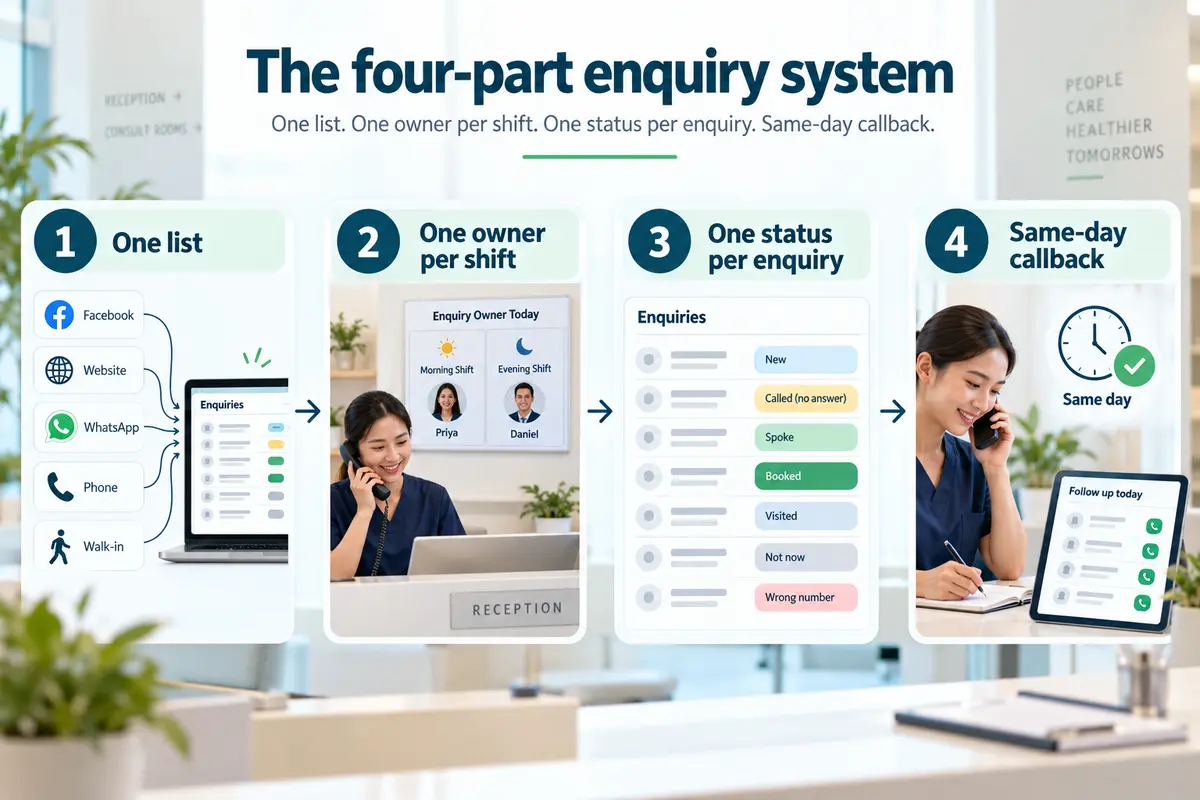
The system below works on paper, on a shared sheet, or in software. Each part is weak without the other three.
1. One list
Every enquiry, from every door, goes on the same list the moment it arrives.
Facebook, website, WhatsApp, phone and walk-in all land as rows on one page, not as messages in five places. The person who sees it first writes it down, even if someone else will call.
The test: Can you count this week's enquiries in one minute? If the answer is a tour of three inboxes and a notepad, there is no list yet.
2. One owner per shift
The list has an owner whose name is written at the top of the shift.
Morning shift, one person. Evening shift, another. The owner's job is not to answer every enquiry personally. It is to make sure that by the end of the shift, every row has a status and a next action.
When the owner of the clinic holds the only Facebook login, the owner is on the morning shift's list whether they like it or not.
Better to give reception a way to see the form submissions, or to have them land on the list without a login at all.
3. One status per enquiry
Every enquiry has exactly one status at any time.
Keep the set short:
- New
- Called (no answer)
- Spoke
- Booked
- Visited
- Not now
- Wrong number
The statuses are agreed once and then used by everyone, so "spoke to her, seems interested" is not a status and does not appear.
Status is what makes the list readable at a glance. The shift owner looks for New and Called (no answer) and works down from there.
4. Same-day callback
Every new enquiry is called the same working day.
If it arrives after 7 pm, it is called before 10 am the next morning.
The rule is written on the wall of reception where patients can read it, because a rule patients can see is a rule staff keep.
If the first call goes unanswered, the status says so and a second attempt is made the next day.
After three attempts with no answer, the status becomes Not now, with the date, and the row stays on the list.
What to track for each enquiry
Eight fields. More than that and reception stops filling them in.
1. Source
Facebook, website, WhatsApp, phone or walk-in.
Without it you cannot tell which door brings patients.
2. Date and time received
Records when the enquiry arrived and starts the same-day callback clock.
3. Name
As given, even if it is only a first name.
4. Phone
The one field that makes everything else usable.
5. Condition or question
One line, in the patient's words: "hair fall", "son's asthma", "fees".
6. Status
One of the agreed statuses, nothing else.
7. Owner
The shift owner's name, so Thursday's question has an answer.
8. Next action and date
Examples:
"Call again Wed"
"Booked Sat 11 am with Dr. Kulkarni at Branch A"
The ninth field, if you add one, is the patient number once she is registered.
That is the field that turns the enquiry list into an answer to the question every owner asks and nobody can answer:
How many of last month's enquiries became patients?
Doing it on paper or a sheet
A clinic with one branch and one receptionist can run this on a notebook.
Rule a page with the eight columns, date it, and keep it at the counter. The shift owner initials the top of the page.
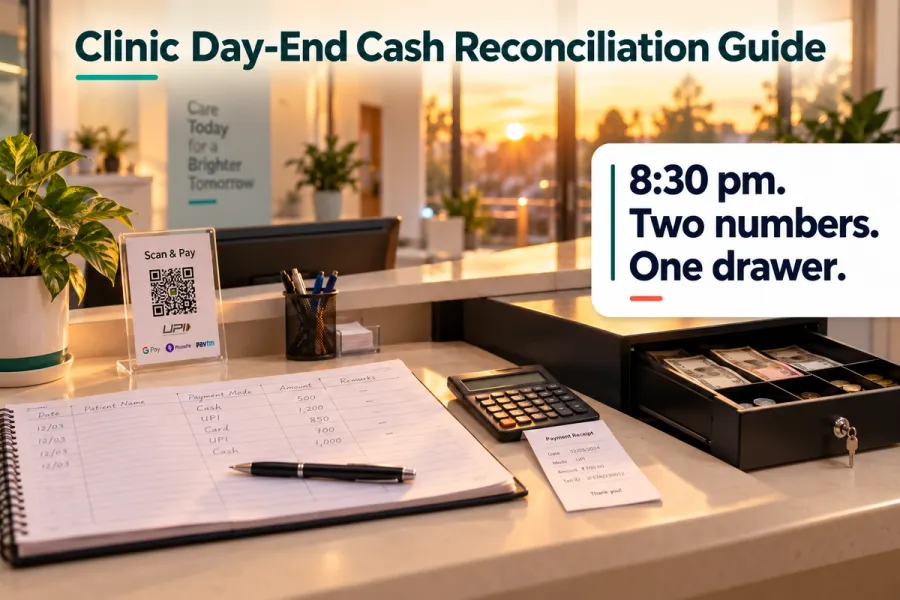
At 8:30 pm, when the drawer is counted, the page is checked: every row has a status, every New row has been called.
Two branches push you to a shared sheet, because the Branch A receptionist cannot see the Branch B notebook, and the owner cannot see either from the car.
The sheet has the same eight columns and one tab per month.
Facebook form submissions and website form emails are copied in by hand by whoever has the login, which means that person has to do it every day, including Sunday.
The honest limit is that paper and sheets depend on the copying.
The enquiry that arrives at 2:40 pm on Tuesday is only on the list if someone with the login put it there.
Everything downstream, the owner, the status, the callback, waits on that one act of copying.
That is the gap software closes, and it is the only gap it needs to close for the system to hold.
What changes when Facebook and website enquiries land on their own
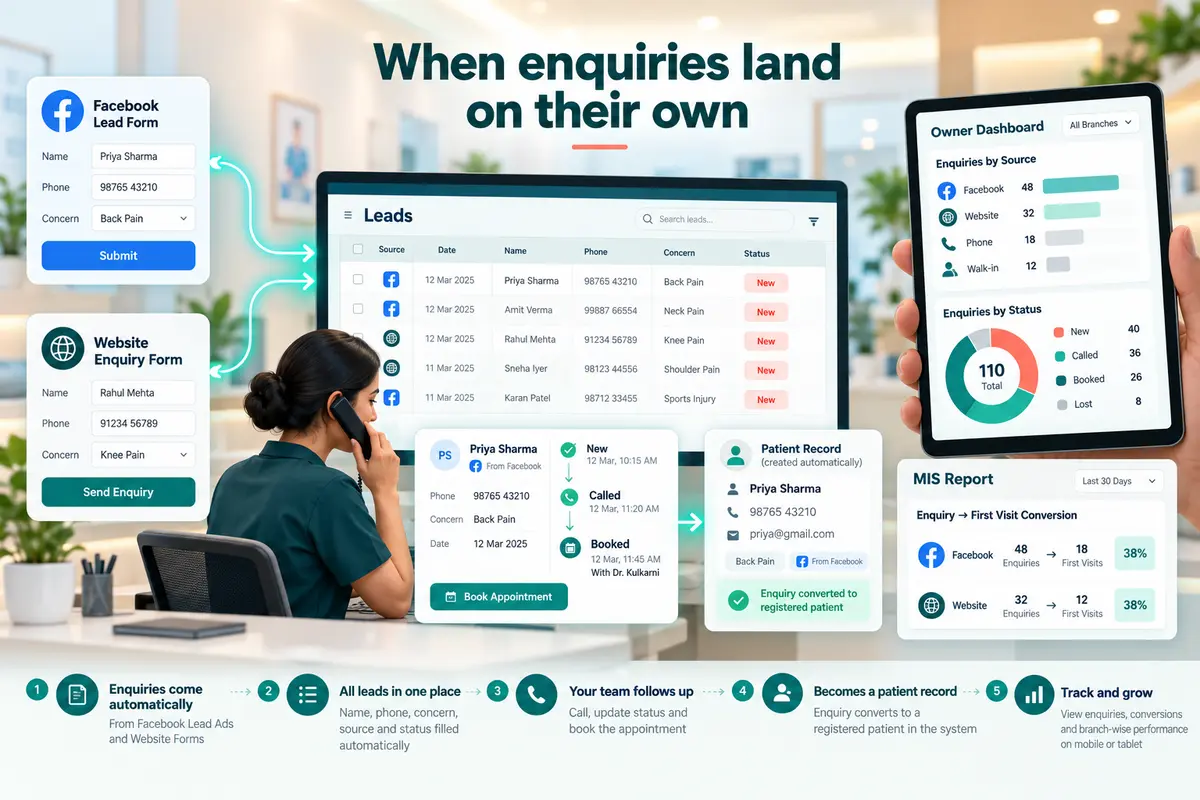
In RevisitPlus the Facebook lead form and the website form are connected, so an enquiry from either arrives on the Leads list on its own, with source, date, name, phone and the concern already filled in.
Reception adds the phone, WhatsApp and walk-in enquiries to the same list by hand.
Lead sources and statuses are configured at onboarding, so the status set is the clinic's own.
With that in place the four parts stop depending on logins.
The Tuesday 2:40 pm enquiry is on the Branch A receptionist's screen a few minutes later with status New.
She calls, logs the call, and books the first visit against Dr. Kulkarni.
The enquiry becomes a registered patient, so the row and the patient file are the same record.
The owner, on the Android app at 1 pm, sees enquiries by source and status for every branch, and in MIS Reports can see how many Facebook lead ads enquiries from September became first visits.
Reception can work the same list on the app between patients, so it also serves as a patient follow up app for the enquiry stage, not only for missed visits.
What does not change is the human part.
Someone still calls, still asks about the son's asthma, still offers two dates.
The software holds the list so that reception can hold the conversation.
Bottom line
Enquiries leak at the join between five doors and one desk.
One list, one owner per shift, one status per enquiry and a same-day callback rule close the join, on paper or on a screen.
Tonight, rule a page with the eight columns, write tomorrow's shift owner at the top, and put it at the counter.
On Thursday, you will be able to say who called the Tuesday enquiry.
Frequently asked questions
How do clinics manage Facebook enquiries?
The clinics that keep them put every Facebook enquiry, from the page inbox and from lead forms, on the same list as phone, website, WhatsApp and walk-in enquiries, with a status and a shift owner.
The problem is usually the login: if only the owner can see lead form submissions, reception cannot call them.
Either share the view or connect the form so enquiries land on the list on their own.
What is lead management for a clinic?
Lead management for a clinic is keeping every enquiry, from every source, on one list with a status, an owner and a next action, from the moment it arrives until it becomes a registered patient or is closed.
It answers two questions: has every enquiry been called back, and how many enquiries from each source became patients.
How quickly should a clinic respond to an online enquiry?
The same working day, and before 10 am the next morning for anything that arrives after closing.
An online enquiry is usually sent to more than one clinic, and the first clinic to call with two concrete dates is the one that gets the first visit.
Write the rule where patients can see it and the staff will keep it.
Can Facebook lead ads connect to clinic software?
Yes. In RevisitPlus the Meta lead form and the website enquiry form are connected, so submissions arrive on the Leads list with name, phone, source and concern filled in, with no login needed at reception.
Phone, WhatsApp and walk-in enquiries are added to the same list by reception.
Lead sources and statuses are set up at onboarding to match the clinic's own.
How do I track which enquiries became patients?
Add the patient number to the enquiry row when she registers, and keep the source on the row.
On paper that is a ninth column.
In RevisitPlus the enquiry becomes the registered patient, so MIS Reports can show enquiries by source and status alongside first visits by month, and the owner can see which door is bringing patients.
Who should be responsible for enquiries at a clinic?
One named person per shift, written at the top of the list.
The shift owner does not have to make every call, but by the end of the shift every row must have a status and a next action.
When there is no name, the enquiry is everyone's and nobody's, which is how the Tuesday enquiry reaches Thursday unanswered.
How do I stop losing patient enquiries on WhatsApp?
Move WhatsApp enquiries onto the list the moment they arrive, with the phone number, the question and the time, and answer from the clinic's own number rather than a doctor's personal phone.