Leads · Feature
Every enquiry called back, and a clear count of who became a patient
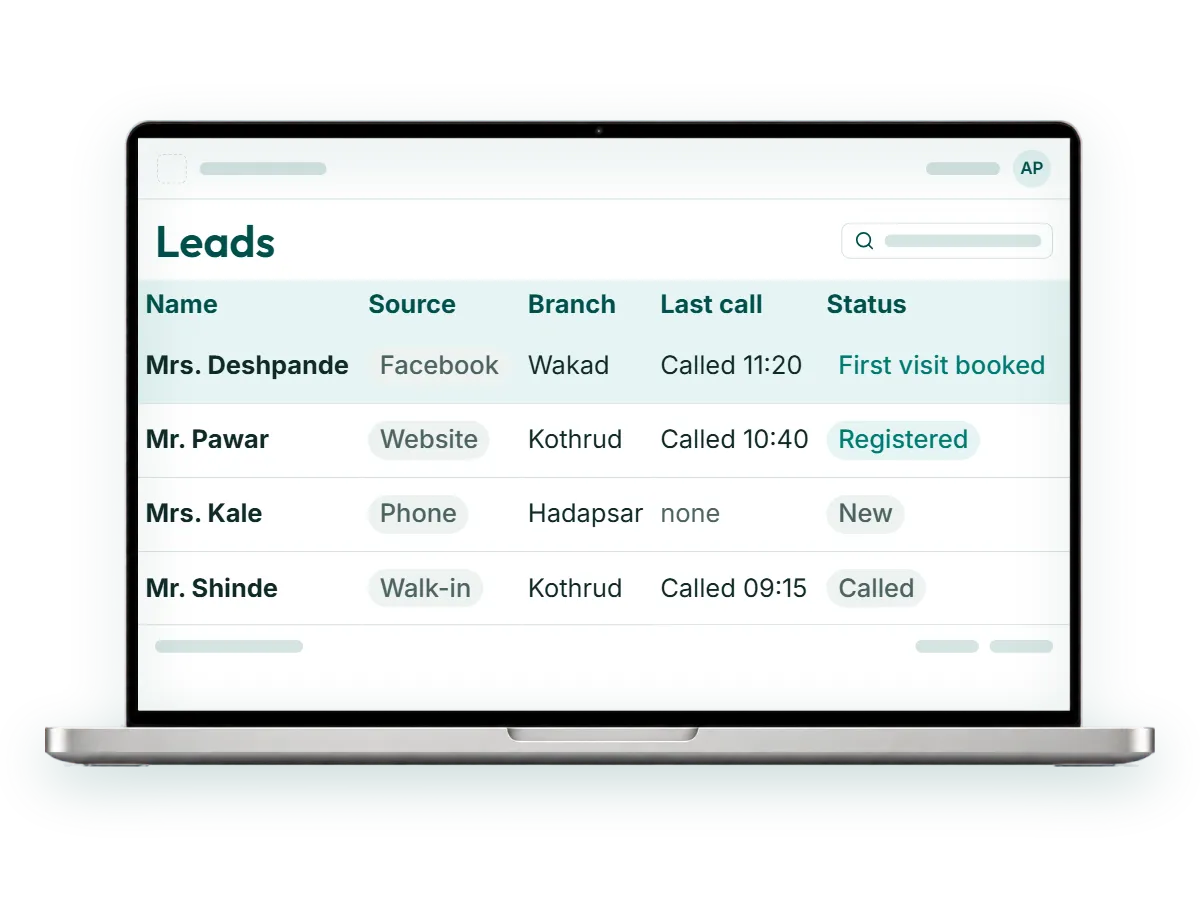
The Leads module in RevisitPlus puts enquiries from Facebook, your website, phone, WhatsApp and walk-ins into one list at reception. Your team calls each person, logs every call with its outcome, and books the first visit. When the enquiry walks in, it becomes a registered patient from the same record, so the owner can see which enquiries turned into patients and from which source.
The problem
The problem this solves: the enquiry leak
It is Saturday at the Wakad branch. A Facebook campaign for hair loss treatment went live on Thursday. Enquiries are coming in.
Some sit in the Facebook page inbox, which only the marketing person checks. Some arrive through the website form and go to an email address the receptionist does not open on weekends. A few people phone the clinic directly, and the receptionist writes their numbers on the back of the appointment register. By Monday there is a WhatsApp group with screenshots, two notebooks and a sticky note on the monitor.
On Wednesday the owner asks a simple question. How many people enquired, how many were called, and how many came in?
Nobody can answer. The money for the campaign is spent. Some enquiries were called twice by two different people. Some were never called at all, and those people found another clinic by Sunday evening.
This is the enquiry leak. It does not show up in any register because the patient never reached the register.
How it works in RevisitPlus
- 1
Enquiries land in one list
Enquiries from Facebook lead forms and from your website form arrive in the Leads list on the web dashboard automatically, with the name, number and source already filled in. Reception adds phone, WhatsApp and walk-in enquiries to the same list. Nobody needs to check three inboxes and a phone.
What this gets you: no enquiry waits in someone's personal phone or an inbox nobody opens.
- 2
Lead sources and statuses are set up for your clinic
At onboarding we configure the sources you use and the statuses your team already speaks in, for example "Not reachable", "Call back Monday", "First visit booked" or "Not interested". The words on the screen are the ones your receptionists already use on the phone.
What this gets you: the list reads the way your front desk already thinks.
- 3
Reception calls and logs every call
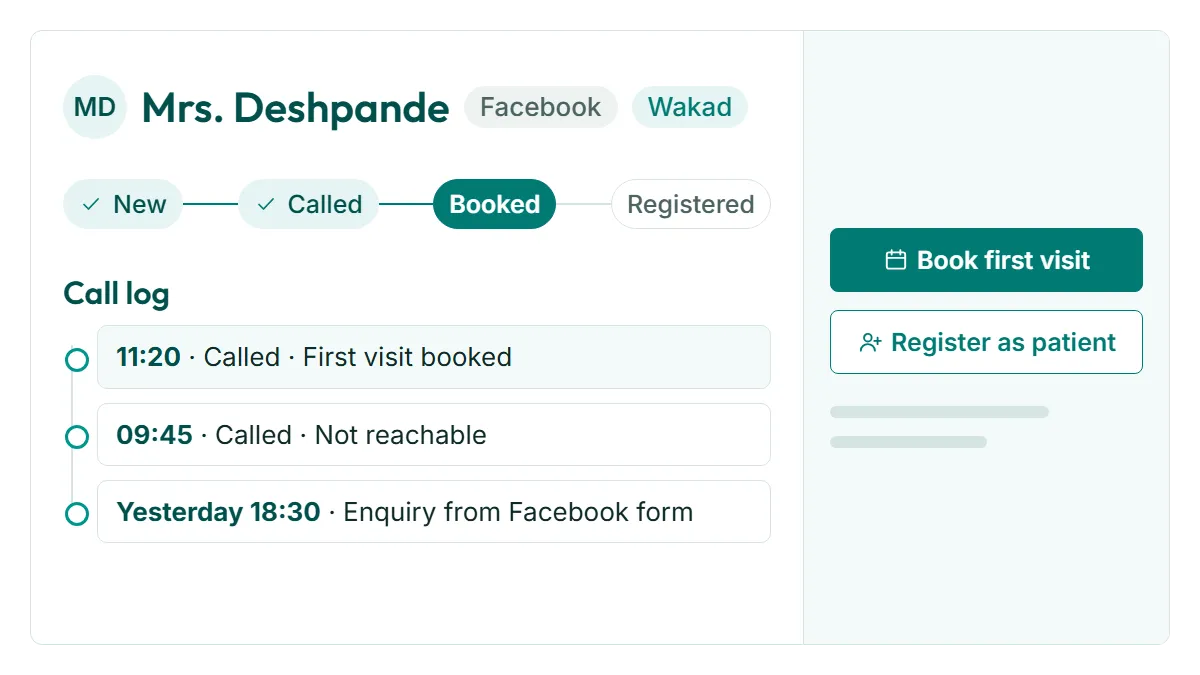
The receptionist opens the list, calls, and records what happened. The next person to open that lead sees the full call history, so nobody calls the same person twice in an hour, and nobody assumes someone else already called.
What this gets you: you can see the effort behind every booking, and the leads that got none.
- 4
The first visit is booked from the lead
When the person agrees to come in, reception books the first visit at the right branch with the right doctor. The appointment then shows on the Receptionist Dashboard and the doctor's list for that day.
What this gets you: the enquiry and the appointment stay one thread from the first call.
- 5
The lead becomes a registered patient
When the patient arrives, reception registers them from the lead record. Their case history, prescriptions and payments then build on that same file.
What this gets you: you can trace any patient back to the enquiry that brought them.
- 6
You see which enquiries became patients
The owner and the practice manager see enquiries by source and by status, and which of them became registered patients. The question from Wednesday now has an answer on the screen.
What this gets you: you know how many patients your Facebook spend and your website produced.
Who uses it
Reception
Works the list through the day: calls, logs, books. The list replaces the notebook and the sticky notes.
Practice manager
Checks which leads have not been called yet and which statuses are piling up. Speaks to the branch where calls are falling behind before the weekend, while those enquiries are still warm.
Owner
Looks at enquiries by source and how many became patients. Decides whether next month's campaign budget goes up, down or somewhere else.
Old way vs RevisitPlus
| Old way | With RevisitPlus Leads | |
|---|---|---|
| Where enquiries sit | Facebook inbox, email, WhatsApp group, notebook | One Leads list for Facebook, website, phone, WhatsApp and walk-in enquiries |
| Who calls back | Whoever remembers | Reception, working the list in order |
| Call history | In one person's head | Logged on the lead, visible to the next person |
| Repeat calls to the same person | Common, and annoying for the patient | Visible before anyone dials |
| Status of each enquiry | Unknown until someone asks | A status your team chose, on every lead |
| Enquiry to patient | Typed again at registration | Registered from the same record |
| Did the campaign work? | A guess based on how busy Saturday felt | Enquiries by source, and which became patients |
How it connects to the rest
What Dr. Tathed's team says
“They have always been very cooperative with our changes, and they have customised it as per our liking.”
Lead sources and statuses are the part of RevisitPlus that changes most often after go-live. A new campaign, a new branch, a new status the front desk wants. The same Pune team makes those changes.
Read the case studyFrequently asked questions
Can RevisitPlus capture leads from Facebook?
Which lead sources does it support?
What about enquiries that come by phone or WhatsApp?
Can we see which enquiries became patients?
Does every lead get a WhatsApp message?
Find out how many enquiries your clinic loses each week
In a 30-minute Patient Journey Review we map where your enquiries arrive, who calls them back and how many become first visits. Then we show your own lead sources running live in RevisitPlus with your branch names.
Pune and Mumbai clinics can have the review in person. Everywhere else, on a call. Pricing is explained on the pricing page.
Last reviewed: 4 Oct 2026 by the RevisitPlus team