Treatment Schemes · Feature
Every treatment scheme, its end date and its balance, on the patient's file
Treatment Schemes is the RevisitPlus module for clinics that sell treatment as a package. You set up each scheme once in the Scheme Master with its name, duration and amount. When a scheme is assigned to a patient, RevisitPlus calculates the end date, tracks what has been collected and what is still due, locks the terms, and sends WhatsApp follow-ups on the scheme's schedule.
The problem
The problem this solves: schemes that live in a register
Most homeopathy practices that grow do it with schemes. A six-month skin plan. A three-month hair plan. A yearly family package. The patient pays in parts, comes for regular follow-ups, and the clinic plans its month around the schemes running.
Then the scheme lives in three places. The amount is in the receptionist's register. The start date is on the case paper. The follow-ups are in the doctor's head. Mrs. Deshpande pays the second instalment at Wakad, but the first was taken at Kothrud, and nobody is sure what is left. Someone gives a small discount at the counter and nobody writes it down. The scheme ends in March, and nobody notices until she asks why the clinic stopped calling.
None of this is dishonest. It is what happens when a package that runs for months is tracked on paper that changes hands every day. The cost shows up as balances nobody collects, follow-ups nobody makes, and renewals that never get discussed.
How it works in RevisitPlus
- 1
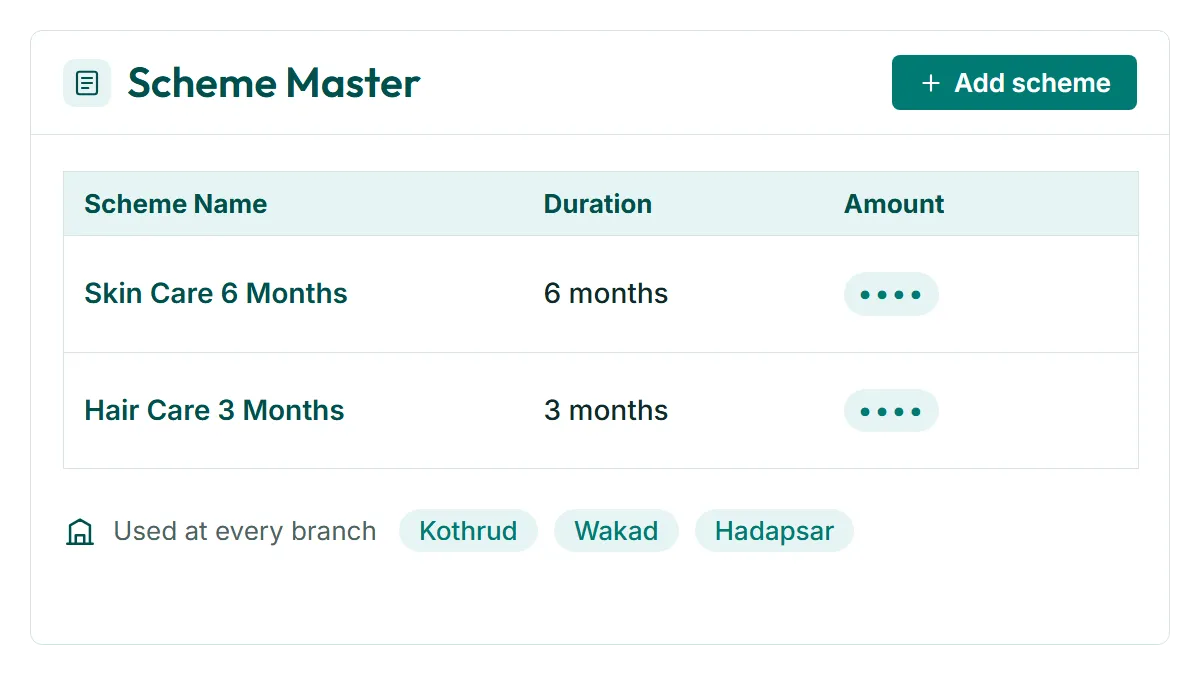
Set up your schemes once in the Scheme Master
Your clinic adds each scheme it offers: the scheme name, its duration and its amount. The Scheme Master becomes the single list of what the clinic sells, used at every branch.
What this gets you: the same scheme means the same thing at Kothrud, Wakad and Hadapsar.
- 2
Assign a scheme while adding the patient log
When the doctor or reception adds a patient log, the configured schemes appear in a list. Choosing one assigns it to the patient. No retyping of amounts, no hunting for the price list.
What this gets you: the scheme is attached to the patient at the moment the decision is made, inside the consultation flow.
- 3
The end date is calculated for you
As soon as a scheme is assigned, RevisitPlus sets the start date and calculates the end date from the duration in the Scheme Master.
What this gets you: every running scheme has an end date the clinic can see, without anyone counting months on a calendar.
- 4
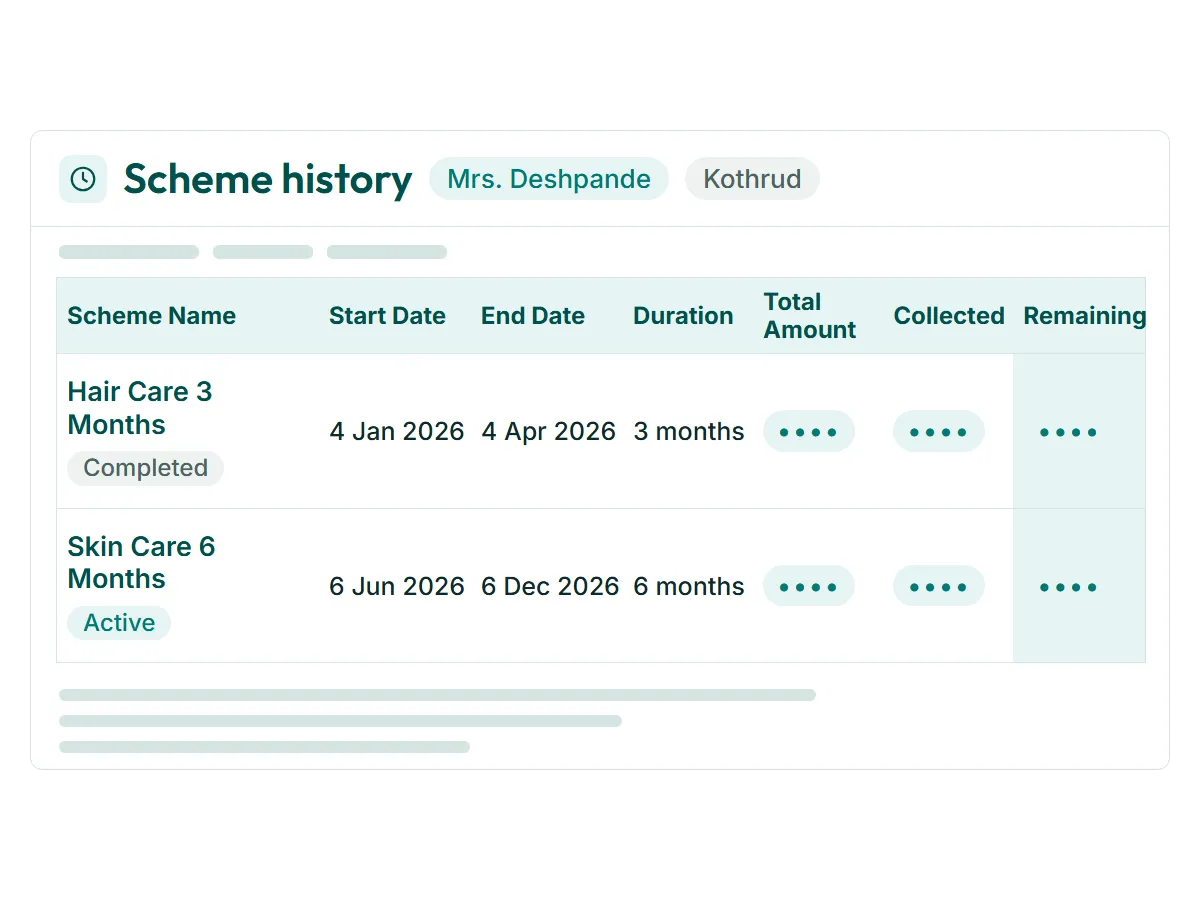
Scheme history on every patient log
Each time a patient log is added, RevisitPlus shows the patient's scheme history with the full details: scheme name, start date, end date, duration, total scheme amount, amount collected and amount remaining.
What this gets you: the doctor and reception see where the patient stands on the scheme before the conversation starts, at any branch.
- 5
Scheme terms are locked once assigned
After a scheme is assigned to a patient, its details cannot be edited. The name, dates and amount stay exactly as they were when the patient agreed to them.
What this gets you: no quiet changes at the counter, and a record you can stand behind if a patient ever questions an amount.
- 6
WhatsApp follow-ups on the scheme's schedule
RevisitPlus sends WhatsApp messages for scheme follow-ups, based on the scheme and the follow-up schedule configured for it. Messages go from your clinic's own business number.
What this gets you: patients on a scheme are reminded to come back, so the plan they paid for is the plan they complete.
Who uses it
Owner
Decides which schemes the clinic offers and has them set up in the Scheme Master. Sees, through MIS Reports, how many patients are on each scheme by branch and doctor.
Doctor
Assigns the scheme during the patient log and sees the patient's scheme history at every visit, including how far into the scheme the patient is.
Reception
Sees what has been collected and what remains before taking a payment, at any branch the patient walks into.
Practice manager
Keeps the Scheme Master current and watches for schemes ending soon and balances still open.
Old way vs RevisitPlus
| Old way | With RevisitPlus | |
|---|---|---|
| Scheme list | A printed rate card, sometimes different at each branch | One Scheme Master for every branch |
| Assigning a scheme | Written on the case paper and the register separately | Chosen from a list during the patient log |
| End date | Counted by hand, if at all | Calculated from the scheme duration |
| Amount collected and balance | Added up from receipts across branches | Shown on every patient log |
| Changing scheme terms later | Possible, and rarely recorded | Locked once assigned |
| Scheme follow-ups | Depend on someone remembering | WhatsApp messages on the scheme's follow-up schedule |
| Patient moves to another branch | Staff phone the first branch for the balance | The scheme history is on the same patient record |
How it connects to the rest
What Dr. Tathed's team says
“They have always been very cooperative with our changes, and they have customised it as per our liking.”
Frequently asked questions
What is a treatment scheme in a homeopathy clinic?
How does RevisitPlus calculate the scheme end date?
Can we edit a scheme after it is assigned to a patient?
Can a patient pay for a scheme in parts?
Does RevisitPlus send reminders to patients on a scheme?
See your schemes running in RevisitPlus
In a Patient Journey Review we set up two of your real schemes in the Scheme Master, assign one to a demo patient, and show the end date, balance and WhatsApp follow-up running with your branch names.
30 minutes. In person for Pune and Mumbai clinics.
Last reviewed: 4 Oct 2026 by the RevisitPlus team