Owner Dashboard · Feature
Know how every branch did today without calling one of them
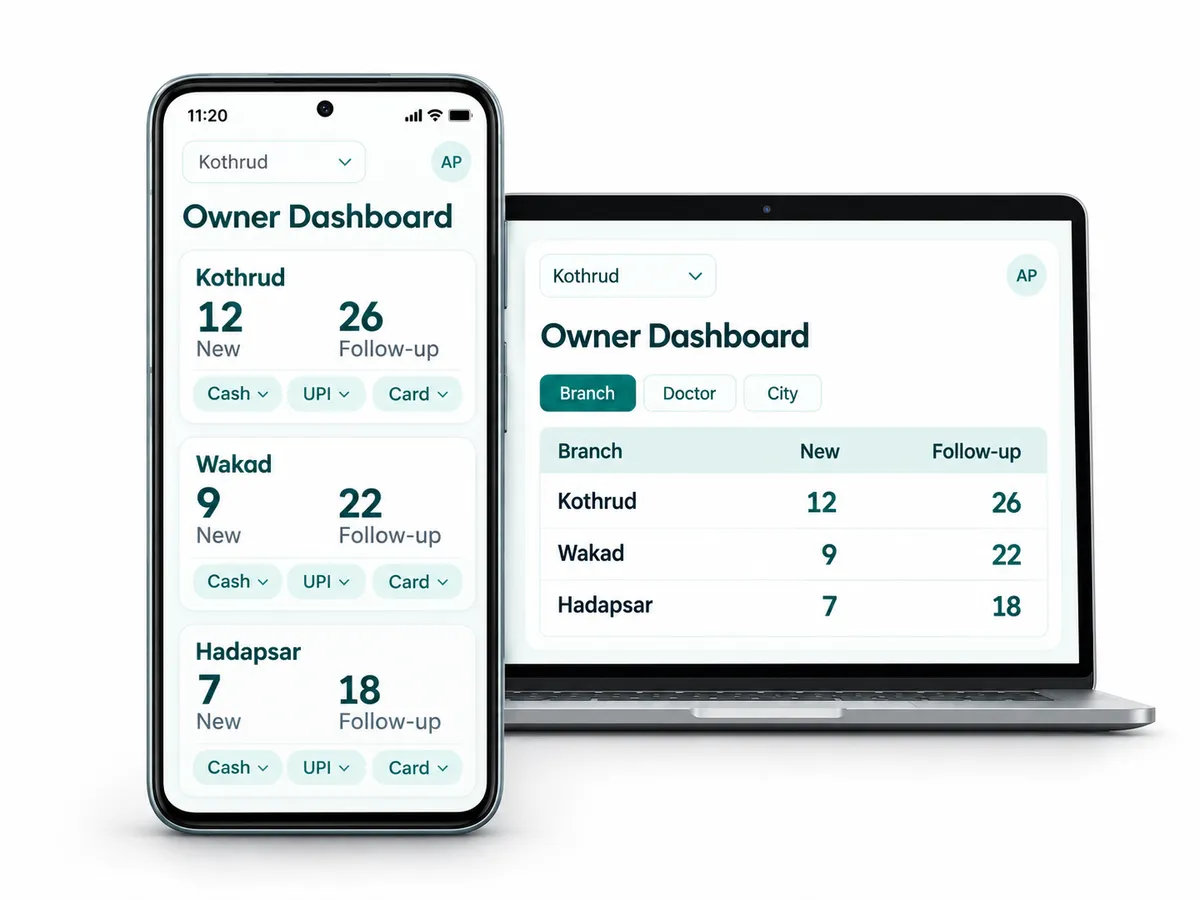
The Owner Dashboard is the clinic owner's screen in RevisitPlus. It shows new and follow-up patients by branch, doctor and city, and today's collections by payment mode, cash, UPI and card. It runs on the web dashboard and on the Android app, so the owner sees every branch from one screen, at the desk or on the phone.
The problem
The problem this solves: the visibility leak
It is 8:45 pm and the owner is in the car on the way home from Baner. Three branches closed in the last hour.
The first call goes to Kothrud. The receptionist reads out the number of patients from the register and the cash total. UPI is "about this much, I will send it on WhatsApp". The second call goes to Wakad, where the doctor is still seeing a late patient and nobody can talk. Hadapsar sends a photo of the register page, slightly blurred.
By the time the car reaches home, the owner has three numbers in three formats and no idea how many of today's patients were new, how many were follow-ups, or which doctor saw whom. Tomorrow the same calls happen again. Nobody minds, exactly. But each call takes a receptionist away from a patient at the end of a long day.
So the owner keeps it in their head. Kothrud is busier on Saturdays. Wakad had a slow month after the campaign ended. Dr. Shaikh's patients seem to come back more often. Some of this is right. Some of it was right last year.
That is the visibility leak. The owner is the one person who needs the whole picture, and the only one who has to phone around to get it.
Memory does not scale. Systems do.
How it works in RevisitPlus
- 1
New and follow-up patients, by branch
The dashboard splits today's patients into new and follow-up, branch by branch. A branch with plenty of new patients and few follow-ups is telling you something.
What this gets you: you see growth and retention as two different numbers, every day.
- 2
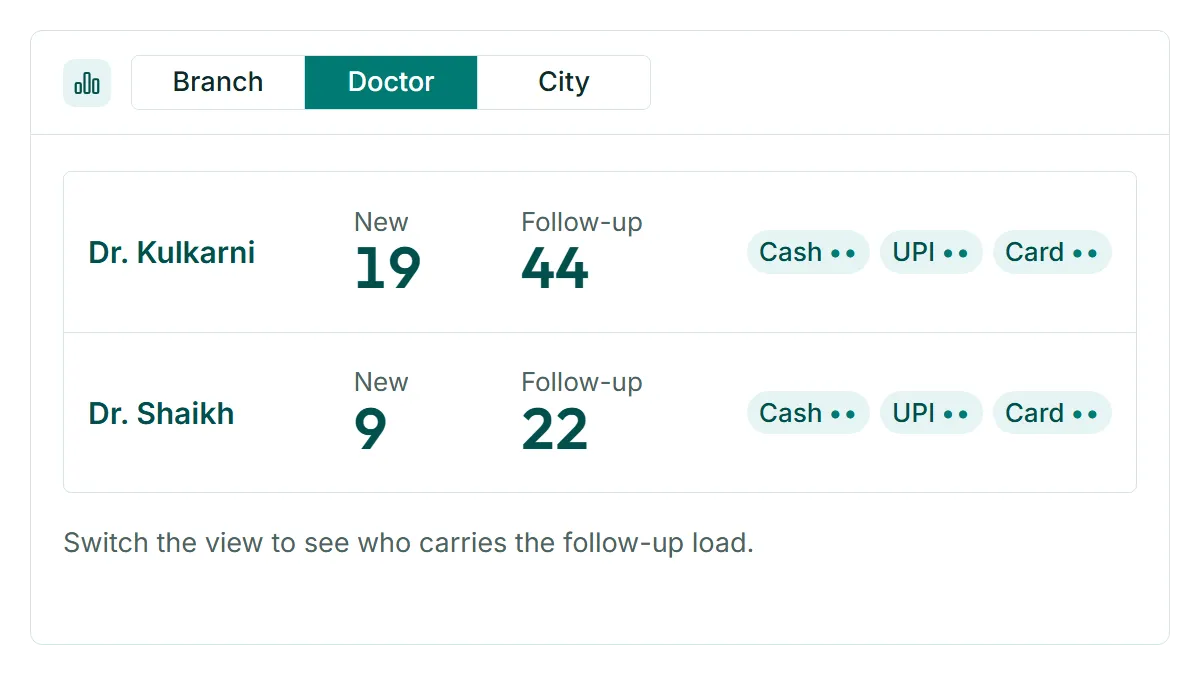
The same view by doctor and by city
Switch the view to doctor or city. See which doctor is carrying the follow-up load, and which part of the city your new patients come from.
What this gets you: staffing and marketing decisions start from data you can see.
- 3
Today's collections by payment mode
Cash, UPI and card, per branch, from the payments reception recorded against each visit. The numbers are the same ones the branch closed its day with.
What this gets you: no evening phone round to collect totals.
- 4
On the Android app and the web
The dashboard runs on the Android app and on the web dashboard. The owner checks it from the car at night or before the first consultation in the morning, and opens the same data on a laptop at the weekend.
What this gets you: the whole practice on your phone, without asking anyone to send a photo.
- 5
The detailed reports behind each number
When a number on the dashboard needs explaining, MIS Reports carry the detail: repeat patients, patients by scheme, disease and appointment status, payments by mode, with filters and export.
What this gets you: the dashboard tells you where to look, and the reports tell you why.
Who uses it
Owner
The main user. Checks it at night and in the morning, and before any conversation with a branch. Where the owner also consults, one look before the OPD and one after it ends covers the whole practice for the day.
Practice manager
Uses the same view to spot the branch that needs attention before the owner asks about it. A branch where collections look low for a busy day usually means payments are waiting to be entered, and that is a quick fix at the counter, not a conversation the next morning.
Doctor
Where the owner is also the senior doctor, this is the screen opened after the last patient leaves.
Old way vs RevisitPlus
| Old way | With the Owner Dashboard | |
|---|---|---|
| How the day went | A phone call to each branch | One screen, all branches |
| New vs follow-up patients | Not separated, or guessed | Split by branch, doctor and city |
| Collections | Read out over the phone, UPI sent later | Today's totals by cash, UPI and card |
| Where it is available | Wherever the register is | On the Android app and the web |
| Which doctor keeps patients | A feeling | Follow-up patients by doctor, Revisit Rate by doctor |
| Which area patients come from | Unknown | Patients by city |
| Monthly review | Registers carried to one office | MIS Reports with filters and export |
| A question about one number | Another phone call | Open the report behind it |
How it connects to the rest
What Dr. Tathed's team says
“We are running three branches, so it was very difficult to manage and coordinate with all the teams. What this software has really helped with is organising the data in a systematic way.”
Frequently asked questions
What is a clinic dashboard?
What does the RevisitPlus Owner Dashboard show?
Can I see it on my phone?
Is the data live?
Can different owners or partners see different branches?
See tonight's numbers before you reach home
In a 30-minute Patient Journey Review we ask how you find out how each branch did today. Then we show the Owner Dashboard running with your branch names, on a laptop and on an Android phone.
Pune and Mumbai clinics can have the review in person. Everywhere else, on a call. No per-branch fee. How pricing works
Last reviewed: 4 Oct 2026 by the RevisitPlus team