One Patient Record Across Branches · Feature
The same patient file open at every branch, with no phone call
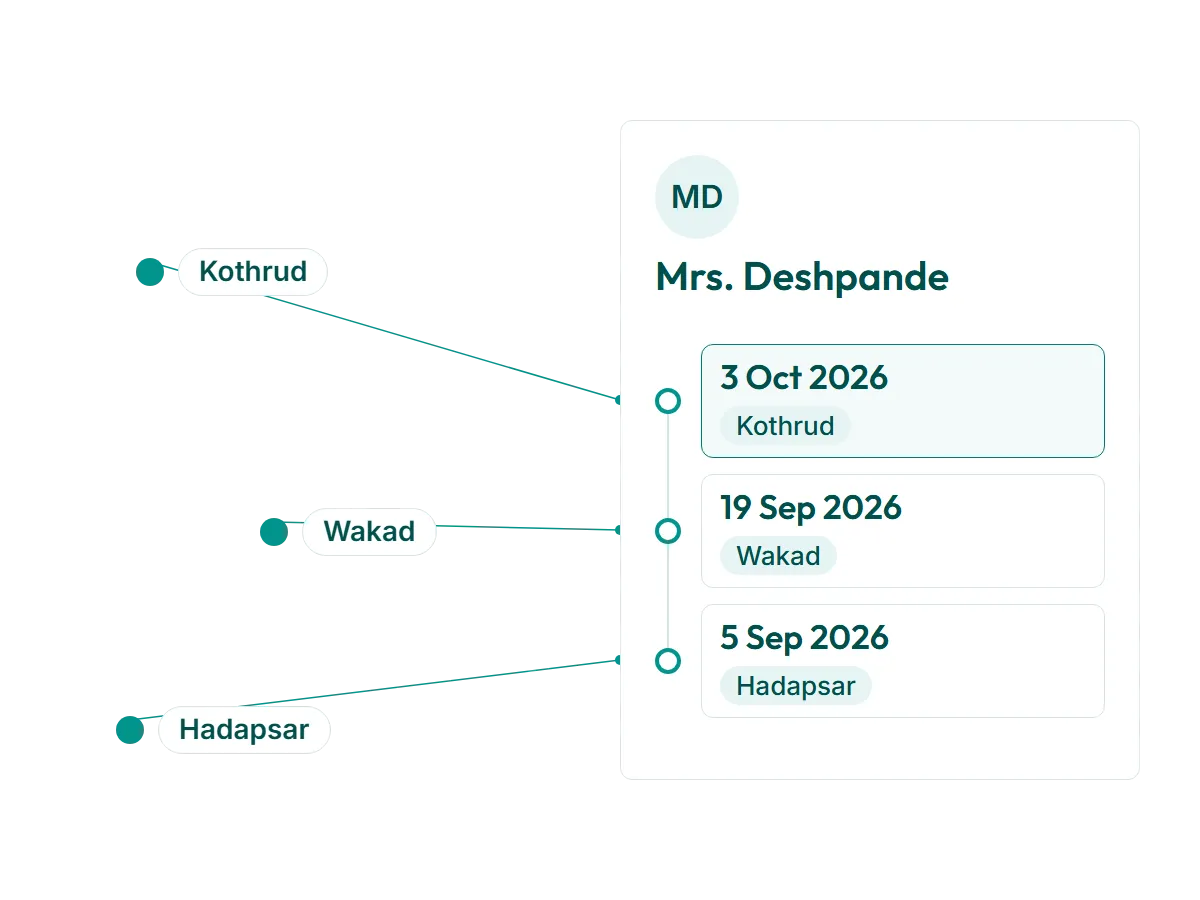
One Patient Record Across Branches is the RevisitPlus module that gives every patient a single file, shared by every branch of the clinic. When a patient registered at one branch walks into another, the doctor there opens the same case history and last prescription without phoning anyone. Who sees what is set by role and by branch, and every change is recorded in an audit trail.
The problem
The problem this solves: the branch leak
When a clinic has one branch, the file cupboard is the patient record. It works because everyone who needs the file is in the same building.
Then the second branch opens. Patients start using whichever is closer that week. A mother who usually brings her son to Kothrud brings him to Wakad on a Saturday because her husband has the car. The receptionist at Wakad opens a new paper file, or searches the register, or phones Kothrud. Kothrud is busy. Someone calls back later with the last prescription read aloud, while the patient waits and the doctor's next appointment slips.
By the third branch, the same patient has two paper files, one of them thin. Nobody is sure which is the real one. The doctor prescribes from what is in front of them, or waits.
This is the branch leak. It costs time at the desk, and it costs trust in the cabin, because the patient can see the doctor does not have the full story.
It also changes how owners think about growth. A third branch should mean more patients for the practice. With paper files it often means three smaller clinics that happen to share a name, each with its own cupboard and its own version of every patient who has visited more than one of them.
How it works in RevisitPlus
- 1
One patient, registered once
Reception registers the patient once, at whichever branch they first walk into. The file belongs to the practice, not to the branch.
What this gets you: no second file at the second branch.
- 2
Every visit adds to the same file
Each consultation, prescription, payment and follow-up date is added to that one record, tagged with the branch and the doctor.
What this gets you: the history reads in order, whichever branch the patient chose that week.
- 3
The doctor at any branch opens it
When the patient walks into another branch, the doctor there opens the file on the Doctor Dashboard and sees the last prescription and the full case history.
What this gets you: the next prescription starts where the last one ended, without a call.
- 4
Access is set by role and by branch
Reception, doctors, practice managers and the owner each see what their role needs. Staff can be limited to their own branch's patients and reports, while the owner and chosen managers see all branches. Case notes stay with the people who should read them.
What this gets you: one shared record without everyone seeing everything.
- 5
Every change leaves an audit trail
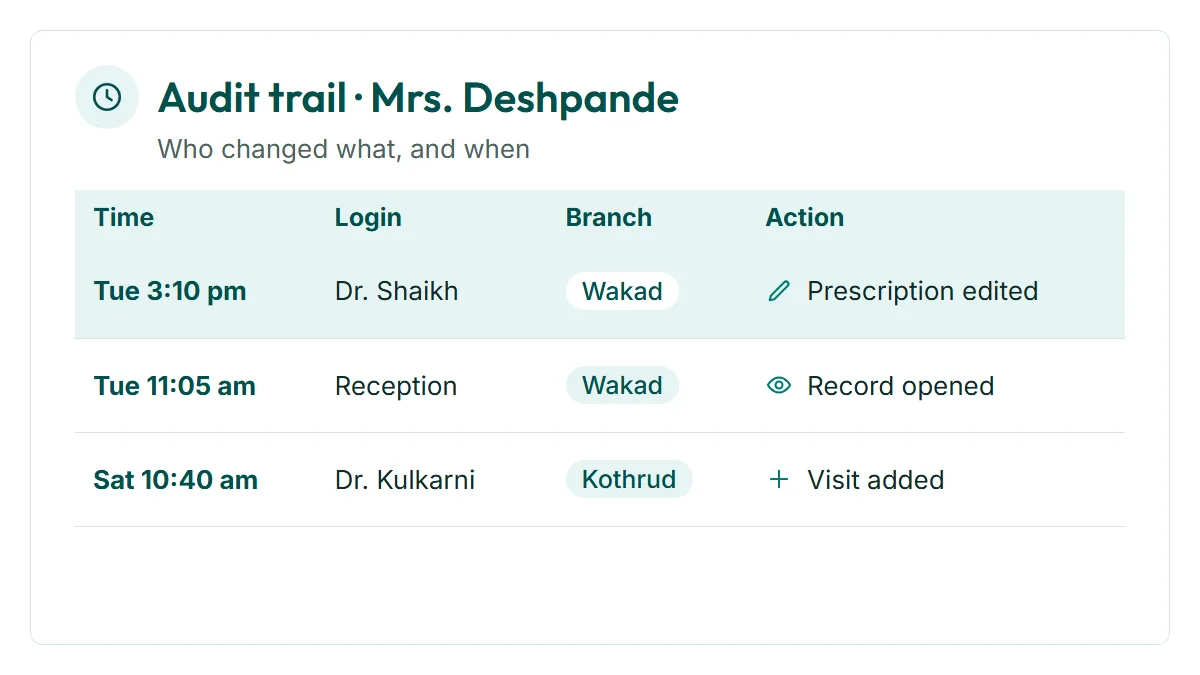
Changes to the record are logged, so the practice can see who changed what and when. That matters more as the team grows and more people at more desks touch the same file.
What this gets you: a record you can trust in a dispute, and a clear answer when someone asks who edited a file.
- 6
Old records come in during normal consultations
Existing paper files are added by doctors as each patient comes in for a visit. Dr. Tathed's team did it this way across three branches.
What this gets you: no separate data-entry project and no weeks of typing before go-live.
Who uses it
Doctor
Opens the full history at any branch, writes the next prescription on top of it.
Reception
Finds the patient by name or number on screen instead of searching the register or phoning the other branch.
Owner
Sees the practice as one set of patients, and can trust that a patient counted at Kothrud is not counted again at Wakad.
Practice manager
Sets who sees what with us at onboarding, and uses the audit trail when a question comes up.
Old way vs RevisitPlus
| Old way | With One Patient Record | |
|---|---|---|
| Patient visits a second branch | New paper file, or a phone call | Same file opens at that branch |
| Last prescription from another branch | Read aloud over the phone | On screen in the case history |
| Files per patient | One per branch, sometimes more | One per patient, for the whole practice |
| Who can read case notes | Anyone who opens the cupboard | Set by role and by branch |
| Who changed a record | Unknown | Logged in the audit trail |
| Moving old records in | A typing project, or never | Added by doctors during normal consultations |
| Counting patients across branches | Double counts, guesswork | One count for the practice |
How it connects to the rest
What Dr. Tathed's team says
“As we have three branches, patients can go from one branch to another, so earlier we had to call and find out what the last prescription was. Through the software, without calling anyone, we can just see it in the software and go ahead with the next prescription.”
Frequently asked questions
What is patient management software?
Can a doctor at one branch see a prescription written at another?
Who can see a patient's case notes?
How do we move our old paper files in?
Who owns the patient data, and can we export it?
See one of your patients open at all of your branches
In a 30-minute Patient Journey Review we map what happens today when a patient walks into a branch they have not visited before. Then we show the same moment in RevisitPlus, with your branch names.
Pune and Mumbai clinics can have the review in person. Everywhere else, on a call. Adding a branch later is quoted in writing as a one-time addition. See pricing
Last reviewed: 4 Oct 2026 by the RevisitPlus team