Doctor Dashboard · Feature
The whole case history open before the patient sits down
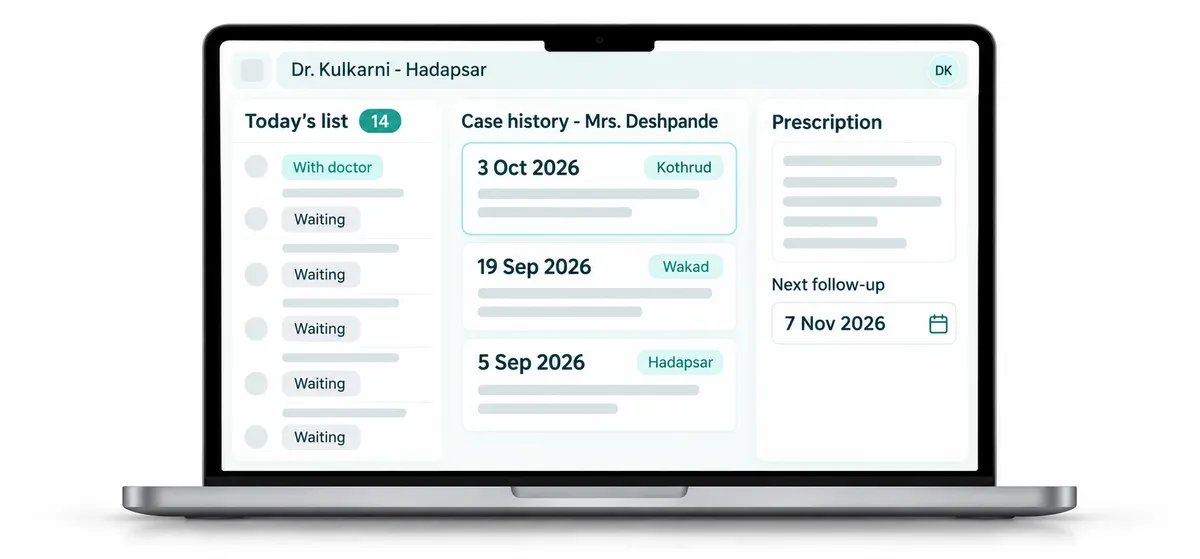
The Doctor Dashboard is the homeopath's screen in RevisitPlus. It shows today's patient list, the full case history of each patient, past prescriptions and medication, and the date of the next follow-up. The doctor writes the prescription, sets the follow-up and reschedules if needed, all in one place. Missed visits show on the dashboard the same day, at every branch.
The problem
The problem this solves: the history that lives in a cupboard
Dr. Kulkarni starts the evening OPD at Hadapsar at five. The first patient is Mrs. Deshpande, back after six weeks for her chronic eczema. She was last seen at the Kothrud branch because it was closer to her daughter's house that week.
Her file is in the Kothrud cupboard.
The assistant phones Kothrud. The receptionist there is with a patient, then finds the file, then reads the last prescription down the phone while someone writes it on a slip. Potency, repetition, the remedy before that, and whether the itching got better or worse. Ten minutes pass. The waiting room fills up. Mrs. Deshpande has told her story twice already this year, and now tells it a third time.
Homeopathy depends on the history. A good prescription is built on what happened at the last three visits, not just the last one. When that history is on paper in another building, the doctor either waits or prescribes with half of it.
Neither is acceptable to a practice that has spent years earning a patient's trust. And the more branches a clinic opens, the more often this happens.
How it works in RevisitPlus
- 1
Today's list, ready when the OPD opens
The doctor logs in and sees every patient assigned for the day, with appointment status from reception. New patients and follow-ups are marked, so the doctor knows which consultations need a full case-taking and which are a shorter review of progress.
What this gets you: you know who is coming, and who has already arrived, without asking the assistant.
- 2
Full case history in one file
Each patient has one case history that builds visit by visit: complaints, observations, prescriptions and notes. It does not matter which branch the last visit was at. If the patient is on a treatment scheme, the scheme history shows while the patient log is being added: scheme name, start date, end date, duration, total scheme amount, amount collected and amount remaining. See treatment schemes
What this gets you: every prescription is built on the whole history.
- 3
Prescriptions and medication
The doctor records the prescription and medication in the file. Reception sees what to dispense. The patient can receive a digital prescription on WhatsApp.
What this gets you: no handwriting for the dispensary to decode, and a copy the patient cannot lose.
- 4
A follow-up date on every visit
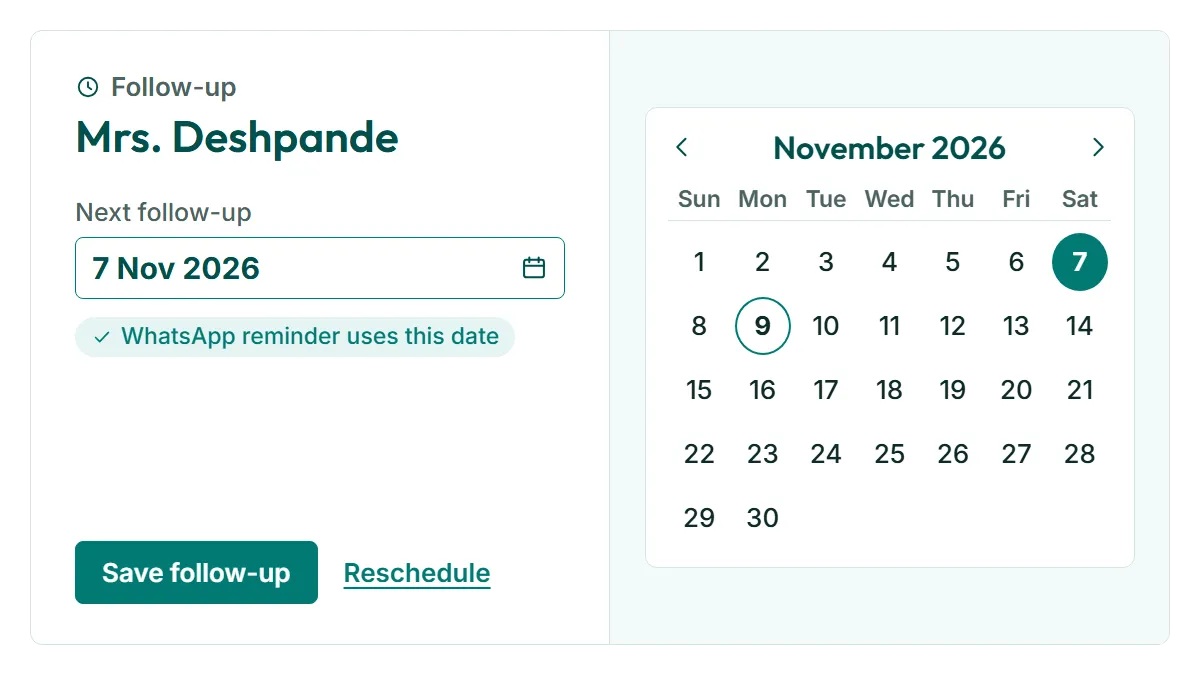
Before the patient leaves, the doctor sets the next follow-up date. It goes onto the clinic's schedule, and the WhatsApp follow-up notice uses it.
What this gets you: the treatment plan has a next step with a date on it.
- 5
Rescheduling from the same screen
If the patient needs to come earlier, or the doctor will be at a different branch that week, the follow-up is moved on the dashboard.
What this gets you: the schedule stays true to what was decided in the cabin.
- 6
Missed visits show the same day
If a patient does not come for a scheduled follow-up, it shows that day on the Doctor Dashboard and on reception's screen. The doctor sees it while the case is still fresh, and reception can call.
What this gets you: a patient who drifts is noticed within a day, while a phone call can still bring them back.
Who uses it
Doctor
The main user. Today's list, case history, prescriptions, follow-up dates. Works on the web dashboard in the cabin and on the Android app between branches.
Owner
Where the owner is also the senior doctor, this is where the day starts. The Owner Dashboard comes later, once the OPD is over and the branch numbers are in.
Reception
Does not write case notes, but works from what the doctor records: medicine to dispense, follow-up dates to confirm, missed visits to call.
Old way vs RevisitPlus
| Old way | With the Doctor Dashboard | |
|---|---|---|
| Today's patients | A list on paper from reception, changing by the hour | Today's list with live status |
| Case history | Paper file, in the branch where the patient was last seen | One case history, open at any branch |
| Last prescription from another branch | A phone call and a slip | On screen, in the file |
| Prescription to the dispensary | Handwritten | Recorded in the file, visible to reception |
| Patient's copy | A paper slip, often lost | Digital prescription on WhatsApp |
| Next follow-up | Written on a card the patient carries | Set by the doctor, on the clinic's schedule |
| Missed follow-up | Found weeks later, if at all | Shown on the dashboard the same day |
How it connects to the rest
What Dr. Tathed's team says
“As we have three branches, patients can go from one branch to another, so earlier we had to call and find out what the last prescription was. Through the software, without calling anyone, we can just see it in the software and go ahead with the next prescription.”
Frequently asked questions
What is case history software for homeopathy?
Does RevisitPlus include a repertory or materia medica?
What happens to our old paper case files?
Can the doctor use it on a phone?
Can a doctor see a patient's history from another branch?
See a patient's history open at a branch they have never visited
In a 30-minute Patient Journey Review we map how a patient moves through your clinic, from enquiry to the next follow-up. Then we show a doctor's day in RevisitPlus with your branch names and your doctors.
Pune and Mumbai clinics can have the review in person. Everywhere else, on a call. How pricing works
Last reviewed: 4 Oct 2026 by the RevisitPlus team